
共计 4053 个字符,预计需要花费 11 分钟才能阅读完成。
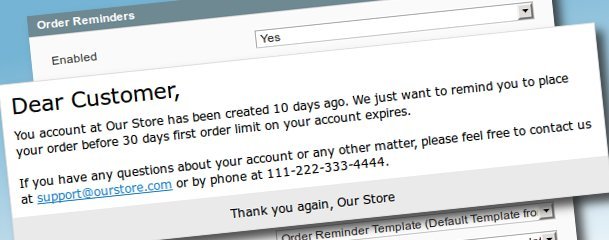
Introduction
Source code for Inchoo_OrderReminder is available from its GitHub repository page, as usual here I’ll just present it’s features and some code snippets. So here are the features of Inchoo_OrderReminder:
- Can send reminder emails to customers who haven’t placed any orders yet, on configurable interval in days.
- Maximum number of email reminders is also configurable, as well as action to take after sending last email reminder (move to different customer group or delete an account).
- Regular and last order reminder email templates are configurable trough Magento’s transactional email templates feature.
- Configurable reminder email sender identity as well as sending reminder emails to additional email addresses as copy or Bcc
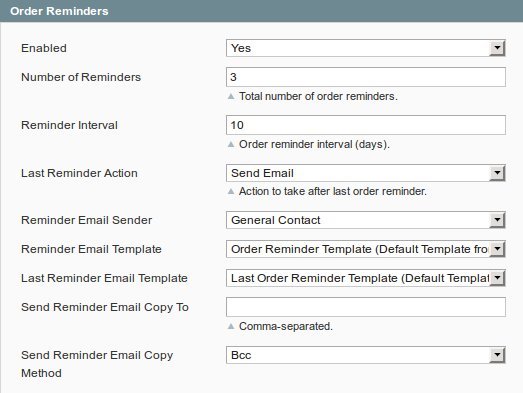
Here’s the screenshot of configuration options available at System -> Configuration -> Sales Emails -> Order Reminders inside your Magento admin area:
Background
In this section I’ll present some code and basic logic behind Inchoo_OrderReminder. Inchoo_OrderReminder_Model_Observer::processOrderReminders() function is configured to be triggered by cron daily to process customers according to the configuration options. Here’s the config.xml code snippet for that purpose:
[php]
<pre title=""><config>
<crontab>
<jobs>
<inchoo_orderreminder>
<!– Daily at 1 am –>
<schedule><cron_expr>0 1 * * *</cron_expr></schedule>
<run><model>inchoo_orderreminder/observer::processOrderReminders</model></run>
</inchoo_orderreminder>
</jobs>
</crontab>
</config>
[/php]
When triggered, this function will derive dates from Number of Reminders and Reminder Interval configuration options, taking Magento timezone configuration option into an account, and then grab all customers whose account has been created on that date, for every derived date. This function will then send emails to customers without any orders using proper transactional email template. It’ll also take actions of moving to another group or deleting customers who have been sent their last email reminder, if instructed to do so by system config options.
Here’s the code snippet of class Inchoo_OrderReminder_Model_Observer’s protected function for sending transactional emails:
[php]
<pre title="">/**
* Send transactional emails.
*
* @param Varien_Object $customer Customer object
* @param int $reminderLimit Number of days for last reminder
* @param int $reminderKey Number of days since customer account was created
* @param string $template Email template
*/
protected function _sendOrderReminderEmail(Varien_Object $customer, $reminderLimit, $reminderKey, $template)
{
$this->_log(‘Preparing email…’);
// Get necessary vars
$copyTo = $this->_getStoreConfigCopyTo();
$copyMethod = $this->_getStoreConfigCopyMethod();
$storeId = Mage::app()->getStore()->getId();
// Uses code from Mage_Sales_Model_Order::sendNewOrderEmail()
$mailer = Mage::getModel(‘core/email_template_mailer’);
$emailInfo = Mage::getModel(‘core/email_info’);
$emailInfo->addTo($customer->getEmail(), $customer->getName());
if ($copyTo && $copyMethod == ‘bcc’) {
// Add bcc to customer email
foreach ($copyTo as $email) {
$emailInfo->addBcc($email);
$this->_log(sprintf(‘Add %s to Bcc.’, $email));
}
}
$mailer->addEmailInfo($emailInfo);
// Email copies are sent as separated emails if their copy method is ‘copy’
if ($copyTo && $copyMethod == ‘copy’) {
foreach ($copyTo as $email) {
$emailInfo = Mage::getModel(‘core/email_info’);
$emailInfo->addTo($email);
$mailer->addEmailInfo($emailInfo);
$this->_log(sprintf(‘Will send a copy to %s.’, $email));
}
}
// Set all required params and send emails
$mailer->setSender($this->_getStoreConfigIdentity(), $storeId);
$mailer->setStoreId($storeId);
$mailer->setTemplateId($template);
$mailer->setTemplateParams(
array(
// Customer object
‘customer’ => $customer,
// Reminder for number of days
‘reminder_days’ => $reminderKey,
// Last reminder number of days
‘reminder_limit’ => $reminderLimit
)
);
// Send
$mailer->send();
$this->_log(‘Email sent.’);
}
[/php]
当然你也可以直接下载最新源码,使用此插件!
For more details about Inchoo_OrderReminder you can always checkout and download up-to-date code from Inchoo_OrderReminder’s GitHub repository page. Cheers and happy coding!












 贤文乐途
孤儿照片扫描功能需要在文章从回收站删除(即完全删除以后)才会起作用
贤文乐途
孤儿照片扫描功能需要在文章从回收站删除(即完全删除以后)才会起作用
 辞了老衲
这个确实有帮助。
辞了老衲
这个确实有帮助。
 21410
请问下载链接在那里?
21410
请问下载链接在那里?
 madkylin
不错,不错,谢谢分享了,好东西啊
madkylin
不错,不错,谢谢分享了,好东西啊 
 feilung
求方法
feilung
求方法