
共计 1847 个字符,预计需要花费 5 分钟才能阅读完成。
Toolbar.php file location:
app/code/core/Mage/Catalog/Block/Product/List/Toolbar.php
Your _construct() function should be modified to look something like:
[php]
$this->_availableOrder = array(
position’ => $this->__(’Best Value’),
‘
name’ => $this->__(’Name’),
‘
price’ => $this->__(’Price’),
’
special_price’ =>$this->__(’Special Price’),
‘ordered_qty’ => $this->__(’Quantity soled’),
);
[/php]
Next we open the list.phtml inside /template/catalog/product/ folder. And you need to find the:
[php]
$_productCollection=$this->getLoadedProductCollection();
[/php]
Expression and cut => paste somewhere to the top of the file. Then we
add some additional logic to that same file. So you should write
something like
[php]
// Custom added
$orderFilterType = $this->getRequest()->getParam(’order’);
// Part of original template code, just moved to top of the file
$_productCollection=$this->getLoadedProductCollection();
// Custom added
if(isset($orderFilterType) && $orderFilterType === ‘ordered_qty’) {
$storeId = Mage::app()->getStore()->getId();
$_productCollection = null;
$_productCollection = Mage::getResourceModel(’reports/product_collection’)
->addAttributeToSelect(’*’)
->addOrderedQty()
->setOrder(’ordered_qty’, $this->getRequest()->getParam(’dir’));
}
[/php]
to the top of the list.phtml file.
File list.phtml should consists of two major parts:
•List mode, which starting with comment
•Grid mode, which starting with comment
At the beginning of each part (mode) there is a “foreach” loop like
[php]
<?php foreach ($_productCollection as $_product): ?>
[/php]
What we need to do now is to duplicate entire content inside that
foreach loop and set it in if-else statement where if statement would go
like:
[php]
<?php if(isset($orderFilterType) && $orderFilterType === ‘ordered_qty’): ?>
// default template code between inside foreach loop
<?php else: ?>
// duplicated default template code inside foreach loo
<?php endif; ?>
[/php]
Now do the same for Grid mode (since grid mode is the default one).
To test if the grid/list is returning the right stuff you might do something like
getName() .’ has been sold in qty: ‘.$_product->ordered_qty.’ –>’); ?>
inside the if statement.









 多乐士
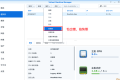
通过摸索发现ssh拉取会报错,直接网页访问下载会报404错误,不知道原因;但是可以通过群晖CM注册表访问下载,其方法如下:
Container Manager-注册表-设置-新增-注册表名称随便写,注册表URL填你的加速地址,勾选信任的SSL自我签署证书,登录信息不填-应用-使用你的地址,这是注册表会显示了,在搜索栏中输入映像名称,搜索结果在每一页的最后一个,你需要划到最后一个进行下载,实测可正常下载安装。
以上供网友参考。
多乐士
通过摸索发现ssh拉取会报错,直接网页访问下载会报404错误,不知道原因;但是可以通过群晖CM注册表访问下载,其方法如下:
Container Manager-注册表-设置-新增-注册表名称随便写,注册表URL填你的加速地址,勾选信任的SSL自我签署证书,登录信息不填-应用-使用你的地址,这是注册表会显示了,在搜索栏中输入映像名称,搜索结果在每一页的最后一个,你需要划到最后一个进行下载,实测可正常下载安装。
以上供网友参考。
 辞了老衲
这个确实有帮助。
辞了老衲
这个确实有帮助。
 渋驀
当然任何时候都可以用curl命令和crontab来实现动态更新DDNS的ip地址:
1、安装crontab之后为root用户创建文件/var/spool/cron/root
2、创建并配置ddnsupdate.sh,放到/usr/bin/文件下,文件内容(以he.net为例):
Autodetect my IPv4/IPv6 address:
IPV4:curl -4 "http://dyn.example.com:password@dyn.dns.he.net/nic/update?hostname=dyn.example.com"
IPV6:curl -6 "http://dyn.example.com:password@dyn.dns.he.net/nic/update?hostname=dyn.example.com"
3、添加执行权限chomod +x /usr/bin/ddnsupdate.sh
4、编辑root用户的crontab:*/10 * * * * /usr/binddnsupdate.sh,每10分钟执行一次。好了,可以享受你的DDNS了
渋驀
当然任何时候都可以用curl命令和crontab来实现动态更新DDNS的ip地址:
1、安装crontab之后为root用户创建文件/var/spool/cron/root
2、创建并配置ddnsupdate.sh,放到/usr/bin/文件下,文件内容(以he.net为例):
Autodetect my IPv4/IPv6 address:
IPV4:curl -4 "http://dyn.example.com:password@dyn.dns.he.net/nic/update?hostname=dyn.example.com"
IPV6:curl -6 "http://dyn.example.com:password@dyn.dns.he.net/nic/update?hostname=dyn.example.com"
3、添加执行权限chomod +x /usr/bin/ddnsupdate.sh
4、编辑root用户的crontab:*/10 * * * * /usr/binddnsupdate.sh,每10分钟执行一次。好了,可以享受你的DDNS了
 21410
请问下载链接在那里?
21410
请问下载链接在那里?
 madkylin
不错,不错,谢谢分享了,好东西啊
madkylin
不错,不错,谢谢分享了,好东西啊 
 feilung
求方法
feilung
求方法
 zengsuyi
应该挺不错的
zengsuyi
应该挺不错的
 zise
看看是怎么操作的。。
zise
看看是怎么操作的。。